Adobe Tools In Slack
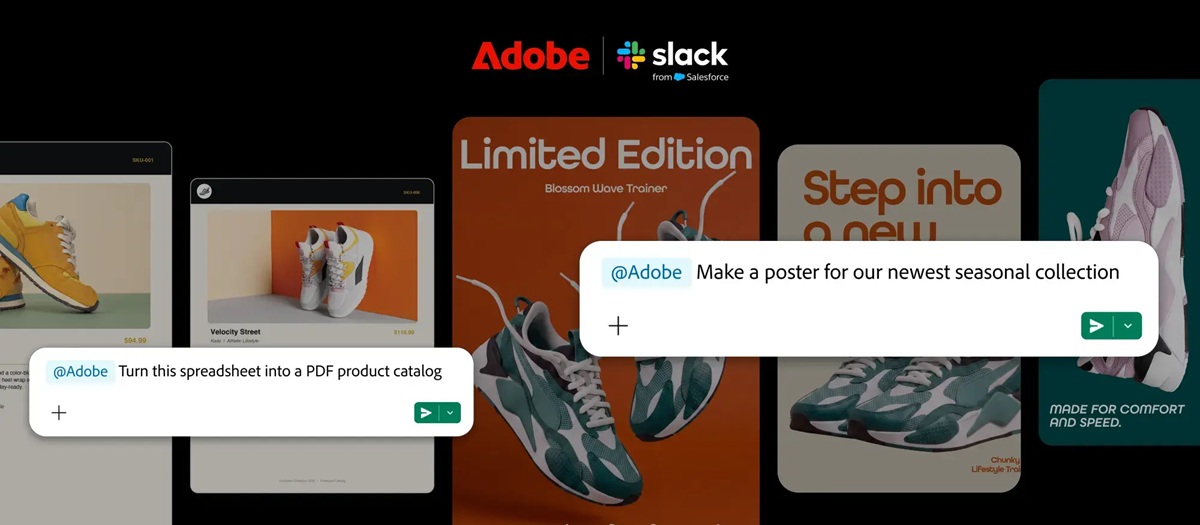
Adobe integrates over seventy Creative Cloud tools into Slack for enhanced team collaboration.
Anonymous
Key Points
1
Slack’s Adobe for Slack integration includes a Slack Marketplace with tools for resizing images and videos for different platforms, removing backgrounds and distractions, adjusting lighting and tone, and applying Lightroom presets.
2
Slackbot uses the Adobe MCP app to route prompts to the most appropriate Adobe tool based on user requests, leveraging context from conversations and Canvases to produce content.
3
The integration introduces an Adobe MCP app within Slack that provides access to more than 70 tools across the suite, including Photoshop, Illustrator, Firefly, Premiere, Acrobat, InDesign, Lightroom and Express.
4
To use the full Adobe for Slack experience, teams must have a separate Adobe subscription in addition to their Slack Business+ or Enterprise+ plan (not all features are included in the Slack plan).
5
Within Slack workflows, users can search Creative Cloud assets by subject, style or mood to tailor materials for campaigns, enabling asset discovery inside channels and Canvases.
Adobe has launched Adobe for Slack, bringing over 70 creative tools directly into the messaging platform for Business+ and Enterprise+ users. FoneArena reported that the integration includes Photoshop, Illustrator, Firefly, Premiere, Acrobat, InDesign, Lightroom, and Express, letting teams edit images, design graphics, and create videos without leaving Slack. Slackbot routes requests to the right tool based on context from conversations and files.
The integration targets teams that juggle multiple Adobe apps daily. iTechPost noted that users can resize images for different platforms, remove backgrounds, adjust lighting, and apply Lightroom presets — all through Slack. Full access requires a separate Adobe subscription beyond the Slack plan, though some features work without signing in.
How the Adobe-Slack Bridge Works
The integration uses an Adobe MCP app that acts as a smart router inside Slack. YugaTech explained that Slackbot understands what users ask for — whether it's editing a photo or building a design — and sends the request to the right Creative Cloud tool. The system pulls context from channel conversations, shared files, and Canvases to tailor each output.
Users can search existing Creative Cloud assets by subject, style, or mood directly inside Slack channels. Newsy Today reported that this lets teams find the perfect campaign image or template in seconds, then edit it on the spot. The workflow cuts down switching between apps and windows.
70+ Tools From Photoshop to Acrobat
The suite spans the full Adobe Creative Cloud lineup. FoneArena listed Photoshop for photo editing, Illustrator for vector graphics, Firefly for AI image generation, Premiere for video work, and Acrobat for PDF editing. Express handles quick designs, while Lightroom manages photo organization and presets. All 70+ tools live inside the Adobe MCP app.
Teams can perform bulk edits across multiple images or videos using templates. iTechPost highlighted platform-specific formatting — resizing graphics for Instagram, TikTok, or LinkedIn — without touching external software. The integration also converts conversations and shared files into finished images, videos, and documents for collaboration.
Why a Separate Adobe Subscription Is Required
Access to the full Adobe for Slack experience requires a separate Adobe subscription beyond the Slack Business+ or Enterprise+ plan. YugaTech clarified that while some basic features work without an Adobe account, signing in unlocks the complete Creative Cloud suite and all AI-powered capabilities. This means teams already paying for Slack must budget for Adobe licenses too.
The move mirrors Adobe's broader strategy to embed creative tools in workplace platforms. Alto noted that Adobe is expanding its Creative Agent approach to make AI-assisted workflows seamless across teams. Similar integrations with Canva and Figma signal how creative software is shifting from standalone apps to collaboration hubs.
Sentiment
Mostly PositiveNEGATIVENEUTRALPOSITIVE
Publishers
18
Articles
12
Reach
30
Topics
A
AnonymousAuthor


